
Photographers' Booking Mistake: No Kanban System
The booking mistake photographers make: tracking leads across scattered inboxes. Use a kanban system to follow up faster and book more clients.
Introduction
One of the most common booking mistakes photographers make has nothing to do with pricing, editing, or marketing.
It is tracking inquiries without a clear system.
A lead comes in through Instagram. Another emails you. A third sends a WhatsApp message while you are in a shoot. You reply to one, star another, tell yourself you will come back to the third, and by the end of the week you are not fully sure who is waiting, who is qualified, and who is ready to book.
That is where bookings quietly leak.
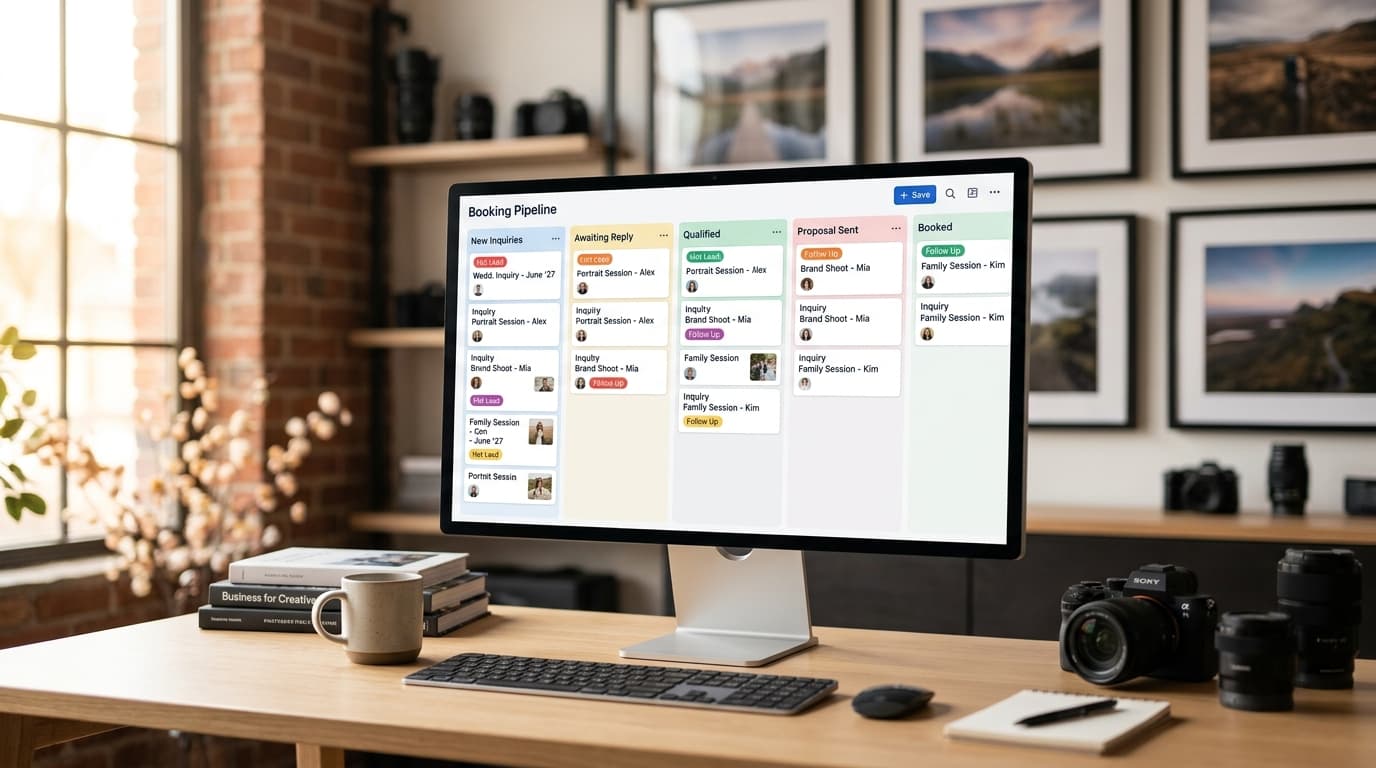
The fix is not more hustle. It is a kanban approach to tracking bookings. Instead of managing leads inside scattered inboxes, you move every inquiry through clear stages like New Inquiry, Awaiting Reply, Qualified, Proposal Sent, Booked, or Closed. That gives you one visual pipeline for the entire first stage of booking management.
In this post, I will break down the specific mistake, why it costs photographers real revenue, and how to fix it with a simple kanban workflow you can start using immediately.
The Mistake Managing Bookings Inside Your Inbox
The mistake is simple: using email, DMs, and memory as your booking system.
Most photographers do not mean to work this way. It usually starts when business is still manageable. A few inquiries per week can be handled manually. You remember who needs a follow-up. You know which couple asked about autumn dates. You can scroll back through Instagram and piece things together.
Then volume grows.
Now you have inquiries across email, Instagram, WhatsApp, contact forms, maybe even text messages. At that point, your inbox is no longer a communication tool. It has become a weak substitute for a CRM.
That creates three problems fast.
1. You do not know the status of every lead
If someone asks, "Did I send that pricing guide already?" you should not have to search three platforms to find out.
When lead status lives inside message threads, nothing is visible at a glance. That means follow-ups are inconsistent, and good leads sit idle longer than they should.
2. You treat every inquiry with the same urgency
Not every inquiry deserves the same amount of attention.
A detailed inquiry with a date, budget, and venue is very different from "hey how much?" in a DM. But when all leads live in inboxes, they arrive as one flat stream. That makes it harder to prioritize serious inquiries.
3. The system depends on you remembering everything
This is the biggest trap.
If your booking pipeline only works when you personally remember what to do next, then the system breaks the second you get busy. And photographers are always busiest at the worst time for admin: weekends, golden hour, travel days, wedding season.
Why this matters: when your tracking system is fragile, your revenue becomes fragile too. The issue is not organization for its own sake. The issue is missed follow-ups, slower replies, and lower conversion from inquiry to booking.
Why This Mistake Costs Photographers Bookings
Photographers usually notice the pain as stress first.
You feel behind. You double-check old threads at night. You worry you forgot someone. You answer messages in the car between locations. You tell yourself you need to "get more organized."
But underneath that stress is a more expensive problem: a weak inquiry process lowers your close rate.
Here is how it happens in practice.
Slow replies make warm leads go cold
Most clients do not contact one photographer. They contact several.
If your pipeline is buried in inboxes, even a solid lead can wait too long for a clear response. By the time you reply, they may have already moved on.
This matters because speed is often interpreted as professionalism. A fast, clear reply signals that you are reliable. A delayed or messy reply signals risk.
Follow-ups happen randomly instead of systematically
A lot of bookings happen on the second or third touch.
The client got busy. They meant to reply. They are waiting on a partner, planner, or family member. If you do not have a visible stage for "Awaiting Client Reply" and a process for following up, those leads disappear into the cracks.
Not because they were bad leads. Because the system did not surface them at the right time.
You waste time on weak leads and neglect strong ones
Without qualification and pipeline stages, a low-intent inquiry can consume the same mental energy as a high-intent one.
That is expensive.
If someone sends a one-line message with no date, no location, and no session type, that inquiry should be handled differently from someone asking for availability on a specific date with a clear budget and urgency. A kanban system makes that distinction visible.
You cannot improve what you cannot see
If all your booking activity lives in message threads, you cannot answer basic business questions:
- How many inquiries came in this month?
- How many were qualified?
- How many got proposals?
- Where are most leads dropping off?
- How long does it take you to respond?
Those are not vanity metrics. They tell you where money is being lost.
Why this matters: photographers often try to fix booking problems by changing pricing, posting more on Instagram, or redesigning their website. Sometimes the real issue is simpler: leads are entering the business, but there is no clean system to move them toward booked.
How a Kanban Booking Pipeline Fixes the Problem
A kanban pipeline solves this by turning booking management into a visual flow instead of a pile of conversations.
Each inquiry becomes a card. Each card moves through stages. At any moment, you can see what is new, what needs action, what is waiting, and what is booked.
This is not corporate overhead. It is a practical way to stop losing track of revenue.
What kanban actually does for photographers
At its best, a kanban board answers four questions instantly:
- What just came in?
- What needs my attention now?
- What is waiting on the client?
- What is closest to booking?
That clarity is useful because booking admin is full of context switching. You are not sitting at a desk all day. You are shooting, traveling, editing, scouting, delivering galleries, and handling personal life in between. You need a system that reduces mental load, not one that asks you to remember more.
A simple example
Let us say three inquiries arrive today:
- A wedding inquiry through your website with date, venue, and budget
- A family session DM asking for pricing
- A WhatsApp message from a previous client asking about a brand shoot next month
In an inbox-based workflow, these land in three separate places and compete for attention.
In a kanban workflow:
- The wedding lead goes to New Inquiry
- After basic qualification, it moves to Qualified
- Once you send pricing or a proposal, it moves to Proposal Sent
The family session DM may stay in Awaiting Details until they share date and location.
The previous client may move quickly to Qualified or Booking in Progress because they already trust you.
That one shift changes your decision-making. Instead of reacting to the last message you saw, you are working from booking stage and business value.
Kanban helps you standardize next steps
Every stage should trigger a clear action.
For example:
- New Inquiry → reply within 1 business hour if possible
- Awaiting Details → ask for date, session type, location, and budget
- Qualified → send pricing guide or package recommendation
- Proposal Sent → follow up in 48 hours
- Awaiting Contract/Deposit → send reminder after 3 days
- Booked → hand off to onboarding
This is where the system starts compounding. Once stages are defined, your responses become faster, more consistent, and easier to automate.
Why this matters: photographers do not lose bookings because they lack talent. They lose bookings because the admin path from inquiry to signed client is too improvised. Kanban replaces improvisation with a repeatable process.
The Best Kanban Stages for Photographers
A good booking pipeline is simple enough to use daily and specific enough to reflect real decision points.
Most photographers do not need 15 columns. They need 5 to 8 clear stages.
Here is a practical setup.
1. New Inquiry
This is where every new lead starts.
The goal is simple: confirm receipt, respond quickly, and prevent any inquiry from being missed.
Include:
- Name
- Channel it came from
- Session type
- Date requested
- Any immediate urgency
Why it matters: this stage acts like your safety net. If a lead enters the business, it should appear here before anything else.
2. Awaiting Details
Use this when the inquiry is incomplete.
Maybe the client asked for pricing but did not mention date, location, or type of shoot. Instead of treating that as a dead end, place it here and ask the few questions needed to qualify.
Example message: "Happy to help. What date are you considering, what type of session are you planning, and where would you like it photographed?"
Why it matters: this stops vague inquiries from cluttering your active pipeline while still giving them a path forward.
3. Qualified
The lead has given enough information to assess fit.
You know what they want, when they want it, and whether it aligns with your services. At this stage, you should be able to recommend a package, quote, or next step.
Why it matters: this is where you focus your real sales attention. These are the inquiries most likely to turn into revenue.
4. Proposal Sent
You sent pricing, a package recommendation, or a formal proposal.
Now the lead needs follow-up if they do not respond.
A lot of photographers make the mistake of considering this "done for now." It is not. This is one of the most important stages because many leads go quiet temporarily, not permanently.
Why it matters: if you do not actively monitor this stage, strong leads stall.
5. Awaiting Contract or Deposit
The client said yes in principle, but the booking is not secure yet.
This stage is critical because verbal intent is not a booking. If the contract is unsigned or the deposit is unpaid, the date is still vulnerable.
Why it matters: this is where many photographers feel falsely safe. A kanban board keeps these near-booked leads visible until they are fully confirmed.
6. Booked
Contract signed. Deposit paid. Date confirmed.
At this stage, the inquiry leaves the sales pipeline and enters client onboarding.
Why it matters: separating booked clients from active leads keeps your sales board clean and prevents confusion.
7. Closed or Lost
Not every lead will book, and that is fine.
Maybe they were out of budget. Maybe the date was unavailable. Maybe they chose someone else. Close the lead and note the reason if possible.
Why it matters: closed leads give you insight. If you keep losing people at the pricing stage, that tells you something useful. If most losses come from unqualified leads, that tells you something else.
Why this matters overall: the right stages create decision points. They tell you what each lead needs next, which leads deserve follow-up, and where your process is breaking down.
How to Switch Without Adding More Admin Work
This is the part photographers worry about most.
You do not want another tool to maintain. You do not want to spend your evenings dragging cards around a board just to feel organized. That concern is valid.
A kanban workflow only works if it reduces admin instead of creating new admin.
Here is how to make the switch cleanly.
Start with your current inquiry flow
List every place inquiries currently arrive:
- Instagram DM
- Website form
- Facebook Messenger
- Text
Then define one destination where every inquiry should appear as a lead card. That is the foundation. If new leads still live only in separate inboxes, the board will always be incomplete.
Keep your stage rules tight
Do not make stage names vague.
Bad examples:
- Active
- Follow-up
- In progress
Better examples:
- Awaiting Details
- Proposal Sent
- Awaiting Contract or Deposit
Each stage should answer: what is true about this lead right now?
That keeps the board useful under pressure.
Add templates for common replies
The real power comes when each stage pairs with a response template.
For example:
New Inquiry reply "Thanks for reaching out. I would love to help. Can you share your date, location, and the type of session you are planning?"
Proposal Sent follow-up "Just checking in on the proposal I sent over. Let me know if you want help choosing the best package for your plans."
Awaiting Contract or Deposit reminder "I am holding your date temporarily. Once the contract is signed and deposit is paid, your booking will be officially confirmed."
Templates save time, but more importantly, they make your process consistent.
Review the board once or twice a day
You do not need to babysit it.
A strong booking board usually needs a quick morning check and a short afternoon or evening pass. The point is to work by exception: look for cards that are stalled, waiting, or ready for follow-up.
That is much faster than checking multiple inboxes repeatedly throughout the day.
Automate the busywork where possible
This is where most photographers get the biggest win.
If your system can automatically:
- capture inquiries from different channels
- qualify them with basic questions
- draft responses
- place them into the right stage
- surface only the leads that need your attention
then the kanban approach becomes realistic even during peak season.
Without automation, a board is still better than chaos. With automation, it becomes a serious booking engine.
Why this matters: the goal is not to become more administrative. The goal is to spend less time chasing inquiry status and more time doing work that actually moves bookings forward.
Conclusion
The common mistake is not that photographers are disorganized people. It is that too many are trying to run a booking business from inside scattered inboxes.
A kanban approach fixes that by giving every inquiry a clear stage, a visible next step, and a consistent follow-up path. You stop relying on memory. You stop missing warm leads. You stop treating your inbox like a CRM.
If you want a practical way to do this without manually managing messages across email, Instagram, and WhatsApp, see how Kaza handles this automatically at heykaza.com.
Frequently Asked Questions
- What is the best kanban setup for photographers?
- A simple pipeline usually works best: New Inquiry, Awaiting Details, Qualified, Proposal Sent, Awaiting Contract or Deposit, Booked, and Closed or Lost. These stages reflect real booking decisions without adding unnecessary complexity.
- Can I use a kanban board if most inquiries come through Instagram or WhatsApp?
- Yes. In fact, that is when a kanban system matters most. Social messages are easy to lose track of, so moving those inquiries into one visual pipeline helps you respond faster and follow up consistently.
- Will a kanban booking system create more admin work?
- It should not. If the stages are simple and tied to clear actions, the system reduces admin by making lead status obvious. It becomes even more efficient when inquiry capture, qualification, and drafting replies are automated.