
One Inbox vs Automation for Photography Leads
Compare one-inbox tools and AI automation for consolidating photography leads without missing messages or losing bookings.
Introduction
Most photographers hit the same wall at some point: inquiries are coming in, but they are coming in from everywhere.
A wedding lead starts on Instagram, follows up by email, and then sends a WhatsApp message three days later asking if their date is still open. Meanwhile, a family session inquiry is buried under story replies, and a corporate lead is waiting in your email drafts because you opened it between shoots and forgot to answer.
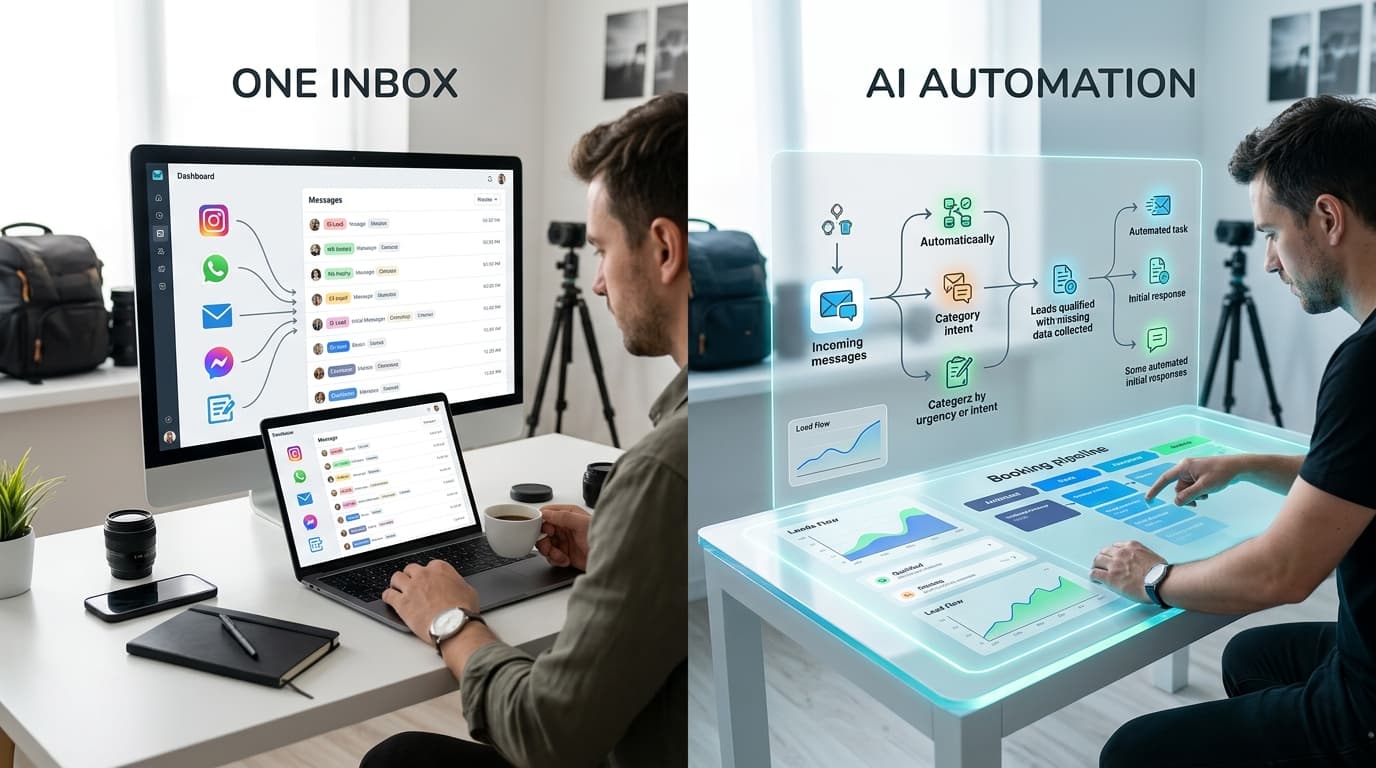
That is why photographers keep debating two approaches to consolidating lead channels. The first is the classic one inbox model: pull every message into one place so nothing gets missed. The second is automation-first lead handling: let software qualify, organize, and draft replies before you ever step in.
Both approaches solve a real problem. But they solve different layers of the problem. If you are trying to stop missed messages and book faster without being glued to your phone, the distinction matters.
The Two Approaches Photographers Actually Use
When photographers say they want to consolidate lead channels, they usually mean one of two things.
The first is: “I want all my messages in one place.” That is the one inbox approach. You connect Instagram, WhatsApp, email, contact forms, maybe Facebook, and read everything from a single dashboard.
The second is: “I do not want to manually manage first-touch communication anymore.” That is the automation-first approach. Instead of only collecting messages into one place, the system also qualifies the lead, organizes the conversation, flags urgency, and helps move the inquiry toward a booking.
This matters because these are not interchangeable decisions. A one inbox tool reduces where you look. An automation-first system reduces how much work you still have to do after you look.
For photographers, that difference shows up fast in real life:
- If you shoot on weekends, a one inbox still leaves you catching up late at night.
- If you get a high volume of low-fit inquiries, one inbox still makes you read every one.
- If leads message across multiple channels, one inbox may centralize them, but it may not resolve duplicates or tell you which conversation matters most.
The debate is really about this: Do you just want visibility, or do you want triage?
That question determines whether you are buying a cleaner inbox or a better booking workflow.
Approach 1: The One Inbox Model
The one inbox model is appealing because it is easy to understand.
Everything lands in one dashboard. Instead of checking email, Instagram DMs, WhatsApp, and forms separately, you log into one tool and process messages there.
Why photographers like it
The biggest benefit is obvious: fewer places to check.
That matters if your current system is pure chaos. If you are bouncing between apps and occasionally forgetting where a conversation started, one inbox software can create immediate relief.
It also helps with response speed. When everything is visible in one queue, you are less likely to miss a fresh inquiry because it came through the wrong channel.
For solo photographers, especially those still handling lower inquiry volume, this can be enough. If your lead flow is manageable and you mainly want a central command center, one inbox tools can give you structure without changing your process too much.
Where it works well
A one inbox model usually works best when:
- You have moderate inquiry volume
- You still want to personally reply to every message
- Your offers are fairly simple
- Most leads do not need much pre-qualification
- Your main pain is scattered messages, not workflow overload
Example:
A portrait photographer gets 10 to 20 inquiries a week across Instagram and email. They do not need advanced qualification. They just need to stop missing DMs and keep all conversations visible. A unified inbox may solve 80% of the issue.
Where it starts to break
Here is the catch: centralizing messages is not the same as managing leads well.
A one inbox still expects you to:
- Read every message
- Figure out whether the lead is a fit
- Ask the same qualifying questions over and over
- Draft replies manually
- Decide what needs follow-up
- Track who has gone quiet
- Move conversations toward booking
So while it reduces app-switching, it often does not reduce mental load nearly as much as photographers expect.
This matters because missed messages are not always caused by bad visibility. They are often caused by decision fatigue.
When 17 inquiries are sitting in one inbox, you still have to interpret each one. Which are real leads? Which are price shoppers? Which need urgent replies? Which are duplicate conversations from the same person?
A cleaner inbox can still become a backlog.
Approach 2: The Automation-First Model
The automation-first model starts from a different assumption.
It assumes the real bottleneck is not just message location. It is the manual work required to turn a message into a booked client.
So instead of only consolidating channels, automation-first systems handle the early-stage booking workflow for you.
What this approach actually does
A strong automation setup typically does four things:
- Captures inquiries from channels like Instagram, WhatsApp, email, and forms
- Qualifies leads by collecting missing details like date, session type, location, budget, and timing
- Drafts or sends responses based on your business rules and tone
- Organizes leads into a pipeline so you only focus on conversations that truly need your input
That means you are not opening a dashboard to face a pile of raw messages. You are opening a pipeline of processed leads.
That distinction is huge for photographers.
Why this matters more than it sounds
Photographers do not lose bookings just because they missed a notification. They lose bookings because the first stage of inquiry handling is messy.
A lead asks, “Are you available on June 14?” You respond six hours later. They answer with a venue name in a different channel. You ask what package they want. They go quiet. Two days later, they come back asking for pricing. Now you are scrolling through threads trying to remember what happened.
Automation helps because it creates consistency where most booking workflows break down.
Example:
A wedding photographer receives this DM: “Hi, are you free for our wedding next September?”
Instead of letting that sit until after a shoot, automation can immediately respond with a polished message, collect the date, venue, guest count, and package interest, and place the inquiry into the right stage.
By the time the photographer checks in, they are not looking at a vague DM. They are looking at a qualified lead with context.
The practical advantages
For photographers, automation-first lead handling usually wins on four fronts.
1. Faster first response
Speed matters, especially for high-intent leads.
If your first reply happens while you are driving home from a session, you are already behind. Automation closes that gap without forcing you to be available 24/7.
2. Better qualification
Not every inquiry deserves the same level of effort.
If someone wants “pricing pls” with no date, no event type, and no location, the system can gather the missing details before it reaches you. That protects your time and lets you prioritize serious leads.
3. Less repetitive admin
Most photographers answer the same first five questions constantly.
Automation removes that repetition. You are no longer thumb-typing your availability process at 11pm for the tenth time that week.
4. Cleaner handoff into booking
When an inquiry is already categorized and enriched with details, your next step becomes obvious.
That means fewer dropped balls, fewer forgotten follow-ups, and fewer leads sitting in limbo because you never had time to “deal with them properly.”
Where Most Photographers Get Stuck
The common mistake is assuming the problem is solved once all channels are connected.
It is not.
A lot of photographers adopt a unified inbox and feel better for a week because the chaos is now visible. But then a new issue appears: everything still depends on them.
That is where the one inbox model reaches its limit.
Visibility does not equal throughput
You can see every inquiry and still fail to respond well.
If your business depends on you manually reading, qualifying, replying, tagging, and following up, then your booking capacity is still bottlenecked by your personal availability.
That matters because photographers rarely have uninterrupted admin time. You are editing, shooting, scouting, traveling, doing consult calls, or simply trying to have a life.
So the real question is not “Can I see all my messages?”
It is: “Can my business keep moving when I am not actively inside my inbox?”
The hidden cost of manual triage
Manual lead handling creates three problems photographers tend to underestimate.
First, inconsistency. Your replies are great when you are focused, and rushed when you are not. That creates an uneven client experience.
Second, delay. Even if you answer everyone eventually, a slow first response can cost you the booking.
Third, attention leakage. Every inquiry pulls you into context-switching. Even five minutes per message adds up fast when you are fielding inquiries across multiple channels.
A one inbox helps reduce the switching between apps. It does not reduce the switching between mental tasks.
Automation does.
Which Approach Makes Sense for Your Business
There is no universal winner. There is a right fit based on the complexity and volume of your inquiries.
Choose a one inbox if
A one inbox approach makes sense if:
- You get a relatively low number of inquiries
- Most of your leads are already qualified
- You prefer to write every response yourself
- Your main pain is simply not seeing messages in one place
- You do not mind handling follow-up manually
This is often the case for newer photographers or niche service providers with simpler sales cycles.
If your inquiry load is light and your offers are straightforward, centralization alone may be enough.
Choose automation-first if
Automation-first is usually the better choice if:
- You get inquiries from multiple active channels
- Leads often arrive with incomplete information
- You are repeating the same replies every day
- You sometimes miss or delay first responses
- You want to protect time without slowing bookings
- You need a system that keeps working when you are on a shoot
This is where established wedding, elopement, portrait, brand, and event photographers usually start feeling the difference.
The more inquiries you handle, the more expensive manual triage becomes.
A simple way to decide
Ask yourself these three questions:
- Am I missing messages because they are scattered, or because I cannot keep up with them?
- Do I need a shared view of inquiries, or do I need fewer manual steps before a lead is ready for me?
- When a lead comes in today, what still depends on me personally?
If the answer to the third question is “basically everything,” then a unified inbox alone probably will not fix the deeper issue.
Conclusion
If the goal is simply to stop checking four apps, a one inbox tool can help. It gives you visibility and reduces the chance that a message disappears into the wrong channel.
But if the real goal is to consolidate lead channels without missing messages and without becoming the bottleneck, automation-first systems are the stronger approach. They do not just collect conversations. They qualify, organize, and move leads forward so you can focus on the ones that actually need your attention.
For most busy photographers, that is the real upgrade. Not one place to read messages. A system that makes fewer messages require manual work in the first place.
If you want to see what that looks like in practice, see how Kaza handles this automatically at heykaza.com.
Frequently Asked Questions
- Is a unified inbox enough for most photographers?
- It is enough if your inquiry volume is low and you mainly need one place to see messages. If you are still manually qualifying, replying, and following up on every lead, you will likely outgrow it.
- What is the main advantage of automation over a one inbox tool?
- Automation reduces manual work before you ever open the conversation. It can gather missing details, prioritize serious leads, draft responses, and organize everything into a booking pipeline.
- Will automation make client communication feel impersonal?
- Not if it is set up well. The goal is to automate repetitive first-touch communication and qualification, then hand off the right conversations to you with full context.